- News and Updates on Nokia E71

Tuesday, July 14, 2009

Free screensavers for your E71, E71x phones – Pikkoo

Pikkoo, a Finish company has launched a ground breaking servicePikkoo logo  which allows users to create interactive flash screensavers and wallpapers for S60 phones including E71 and E71x which support Flash Lite.

You can browse the creations of the members of Pikkoo here.

The service was launched in May this year and it is pretty easy to use.

  1. Just go to the create screensaver or wallpaper page 
  2. Add the background that you like
  3. Add any clips if needed
  4. Add any widgets (clock, battery and signal strength)
  5. Add any shapes you want
    Pikkoo create page
  6. In the next step add any effects that you want to add to the components of your screensaver or wallpaper.
  7. Each component can be resized, rotated and assigned a different color. In addition you can assign any transparency to each component individually.
  8. Once you are done you hit the preview button and review your creation
  9. If you are satisfied with the result you need to name your creation and assign two tags to it.
  10. In the next step you create a thumbnail of you screensaver or wallpaper which is done by cropping a part of your creation.

You can now download the screensaver as a swf file and use it as a screensaver. Check out my creation on Pikkoo here. Screensaver for E71

Pikkoo has a advanced screensaver manager for your phone which allows you to tweak the settings of the screensavers on your phone in addition to free unlimited screensaver downloads from the Pikkoo website.

Another cool feature that has been launched by Pikkoo recently are screensavers for phones which also have the updated live weather of you city. You can create a live weather based screensaver here.

Services like Pikkoo make phones more interactive and user friendly and it is no wonder that they were declared as a top 5 mobile start up at Mobile2.0 Europe.

Stumble Delicious Technorati Twitter Facebook

Tuesday, July 7, 2009

Share the applications for E71. Decide where to host the files. Box.net may not be a good idea as they will take it off very fast

Stumble Delicious Technorati Twitter Facebook

Monday, July 6, 2009

E71 and E71x Firmware update – Full details of all the changes

Recently E71 and E71x’s firmware was updated. The latest version of the firmware is Vr 300.21.012 dated July 2, 2009. I could not get the full details of the changes made in the latest firmware.

E71 photo

Nokia states that Vr 300.21.012 update is a major feature release and also was intended to correct main complaints from Customers and Operators

I’m not going to list all the changes but those ones which I think are important. If you want details on all the changes you can go to the Nokia Addict website to see the whole change log and tweaker website. I have divided the changes into new functionalities (functionalities that were not there in the previous versions) and improvements

NEW FUNCTIONALITIES

  • Myspace, Youtube and Facebook support (NA for HK andfacebook Taiwan variants)  youtube
  • Support for Rapido Yawe 1.15
  • Gimlet 5.2 (v 9.5.2.66) – useful for developers as it allows a better environment.
  • Mail for Exchange 2.9 (new version) with improved stability and performance.

IMPROVEMENTS

  • Increased robustness of the Home Key functionality. ThisHome key icon for E71 helps avoid the problem of Home key not opening the  menu. This was a problem many users complained about and therefore is a welcome update.
  • Support for receiving more SMSs. Allows more than 4000 messages in inbox.
  • Improved functionality and stability of Internet Radio
  • WLAN functionality improvement.
  • Improved Switch application functionality
  • Internet Radio 1.14 – Increased Functionality and Stability
  • VoIP upgrade – Improved functionality and stability. Now  better quality calls using VOIP on E71
  • Download Client 3.2 – Greater stability and improved functionality
  • Email Setup Wizard Update – Supports Gimlet 50408
  • Support for conference numbers longer than 24 digits
  • Improvements in Browser for seamless YouTube support
  • Bug fixes for the Nokia PC Internet Access Application
  • Improved BT headset connectivity. This was a major complaint of E71 users.
  • Increased robustness in handling SMS
  • Security Updates and vulnerability fixes
  • Phone not suspending packet data connection when receiving call – Fixed
  • Minor audio related bugs fixed. I’m a little confused about music icon for E71this as I did not notice any change. I had hoped that the hiss in the media player tracks would not be there but alas it is still there.
  • Fix to prevent Wifi Certification issues when Wifi alliance moves to Win 2008 as the test server
  • Minor improvements in the UI and search facility of contacts

One this that is queer is that though people have reported improvements in the quality of the photos taken with the E71 after the firmware update there is no mention of that in the changelog. So is it that people are seeing things.?

Let me know if you know of any other major change or update included in the firmware update.

Technorati Tags: ,,

Stumble Delicious Technorati Twitter Facebook

Sunday, July 5, 2009

Applications for download for E71 and E71x phones by Nokia

NokiaAddict is one my favorite resources which I use to update myself on Nokia phones.

Gerrymoth has created a list with the downloads for E71, N95 and N96 phones. He has archived all the software into one download which can be found here. It is mentioned that the file would be updated monthly however, it does not seem to be the case as the last update was made in January 2009.

Please note that all the software mentioned is not freeware. Those that are not freeware are trailware (in such cases the software stops working after the period of trial is over which is typically 15 or 30 days).

Some of the software that is featured on the list is

  • Nokia Chat
  • Nokia Maps
  • Nokia Email
  • Nokia Sports Tracker
  • Nokia Internet Radio Player
  • Handy Taskman
  • Handy Calendar
  • Handy Clock
  • Google Mail & Mail by Google
  • Google Maps
  • Scribe (WordPress Client)
  • Mobbler (Last.fm Player & Scrobbler)
  • Y-Browser (File Manager)
  • Skype (BETA)
  • Fring

Check out the list on the NokiaAddict download section and you are sure to find something interesting that you have not used in the past.

Stumble Delicious Technorati Twitter Facebook

A colorful and minimalistic theme for your E71 and E71x

I’m going to share two of my favorite themes today for E71 and E71x by Nokia phones. All themes that I share on this blog have been tested by me personally.

S60 BLACK THEME FOR E71

AcidSonic’s S60 black theme was one of the featured theme on Symbian Freak. The S60 black theme contains icons by AcidSonic.

Highlights of the S60 black theme are
S60 black theme for E71, E71x and S60 phones

  • Dark theme
  • Colorful theme which primarily uses steel grey, green and pink
  • High contrast and colorful icons. The icons that have been used are Acidsonic’s icons which are crisp and modern. The address book and contact book do not follow the theme style and design on the E71
  • S60 logo on the home screen

Screenshot of S60 Black theme for E71, E71x and S60 phones

Download
Download the S60 Black theme from Rapidshare
Download the S60 theme from Box.net
Download the S60 Black theme from Symbian Freak

SKETCH THEME FOR E71 OR E71X PHONES

The Symbian Freak theming community is quite vibrant community. Another theme that I liked is the Sketch by Sauromatum. The highlights of the theme are

Screenshot of Sketch theme for E71, E71x and S60 phones

  • it is a lightweight theme which frees up some more resources for applications on your E71
  • Minimalistic theme with white base
  • Cursive look to the theme
  • icons are made by Blue_Ray
  • Two options are available one with default icons and the other with customized icons

Screenshot of Sketch theme for E71, E71x and S60 phones

Download
Download the Sketch theme with customized icons from RapidShare
Download the Sketch theme with customized icons from Box.net
Download the Sketch theme with customized icons from Symbian Freak
Download the Sketch theme with default icons from Symbian Freak

Let me know what kind of themes would you like to be posted here in the future.

Technorati Tags: ,,,,

Stumble Delicious Technorati Twitter Facebook

Firmware update for E71 (Vr 300.21.012) camera photo quality fix?

In a earlier post on this blog I had reported that the latest firmware update (Vr 300.21.012 dated July 2, 2009) does not improve the quality of the photos taken with E71 or E71x.

However, today I saw that the E71 Fanatics Forum has a post that contains photos taken from E71 before and after the upgrade. There seems to be a marked improvement in the quality of the photos taken with the camera of E71. The annoying purple tinge is no more there in the photos.

The photos were posted on Howard forums by a user called ‘Weirdo’.

Photo taken after the firmware (Vr 300.21.012) update

Photo taken from E71 before the firmware update Photo taken before the firmware update on E71
Photo taken after the firmware update on Nokia E71 This is exciting news for all E71 owners as one of the biggest complaint of E71 users has been the quality of the pictures taken with E71. This news will push me to update the firmware of my E71 sooner than I wanted to. Most likely I will update the firmware for my E71 today.

Meanwhile if anyone has updated the firmware on their E71 or E71x please let us know if there is a difference in quality of the pictures taken after the firmware update.

Stumble Delicious Technorati Twitter Facebook

Saturday, July 4, 2009

How to use the graphic equalizer in your E71 and E71x

The other day I was going through the post on Tekseven on “Optimize Music Quality on the Nokia E71 / Nokia E71x”. Some of the suggestions to improve the sound quality of your E71 and E71x are

  1. Invest in a quality headsets.
  2. Invest in a quality 2.5mm to 3.5mm convertor.
  3. Adjust music player settings and equalizer.

The last suggestion was particularly interesting but what was surprising for me was that the media player has options for sound settings and graphic equalizer settings. I had never seen those options. While trying to follow the instructions in the post I could not find the graphic equalizer. The post had no information where one could find the sound and graphic equalizer settings. Finally I found the settings and decided to share the information.

SETTINGS FOR GRAPHIC EQUALIZER ON E71
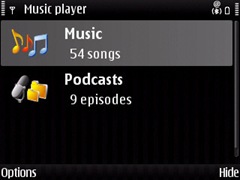
  1. Go to Menu –> Media –> Music Player. The screen you would get is similar to the one below listing the Music and any Podcasts that might be there on your phone.
    Screenshot of Music Player on E71
  2. Selecting music would list all the playlist and songs on your phone. Refer to the screenshot below.
    Music playlist in E71 in the media player
  3. Select ‘All songs’ and you get a list of all songs,
  4. Select one song by clicking the center button of joystick and the media player would start playing the selected song.
  5. When the song is being played press the options button (left button) and you would get the menu with one of the option being equalizer (check the screenshot below).
    Media Player on E71 with the equalizer option
  6. Select equalizer and you would get the presets available for the equalizer which are bass booster, classical, Pop and Rock.
    Media player's equalizer options on E71
  7. You can also create your own preset by using the options (left button) and selecting new preset.
    A new preset option for graphic equalizer on E71
    The graphic equalizer is handy and it does improve the quality a bit depending on the type of music you are listening to.
SETTINGS FOR THE SOUND ON E71
  1. Follow the first 4 steps listed above
  2. After that bring up the options menu by clicking the left button. One of the option would be Audio settings (screenshot below)
    audio settings in E71 for media player
  3. Select audio settings and the next screen would give you the options of setting the balance, loudness and stereo widening (see the screenshot below).
    Audio settings on Nokia E71
  4. It is recommended that the balance should be set to exactly in the center and loudness and stereo widening is off. This is the recommended settings but you can play around with it and check for yourself which one works better.

You can use both the equalizer and audio settings to tweak the sound output of your E71 or E71x to customize it according to your personal preferences. However, these settings do not help in eliminating the hiss which customers complaint about on E71 and E71x.

If you tweak the sound settings please share the audio and graphic equalizer settings that work the best for you.

Stumble Delicious Technorati Twitter Facebook

Related Posts with Thumbnails

Copyright © 2009 Nokia E71 All rights reserved. Theme based on theme by Laptop Geek.

Creative Commons License
E71 by Nokia Blog by Pali madra is licensed under a Creative Commons Attribution-Noncommercial-Share Alike 3.0 United States License.
Based on a work at e71bynokia.blogspot.com.