- News and Updates on Nokia E71
Showing posts with label e71tricks. Show all posts

Saturday, December 5, 2009

How to do a hard reset of Nokia E71

Sometimes, (for example when your phone is too slow), you have to do a hard reset of the phoneReset of Nokia E71 specially if you are like those (and me ;-) who like to test all the applications out there on your Nokia E71. Hard set it of  the phone enables you to remove everything you have installed on your phone and the default factory settings are enabled. It is just like reformatting your computer.

Warning

Please back up all the data on your Nokia E71 and the memory card before resetting the phone (if you do not know how to back up your personal data on the Nokia E71 give me a shout). There are lots of cases where users have reset their phone and realized later that they have lost all their personal data.

How to do a hard reset of Nokia E71
  • Switch on the phone
  • While the phone is the standby mode enter this code *#7370#
  • The phone would ask for a password, the default password is 12345 unless you have changed it before.
  • That is it you are done


But I do not want to loose my personal data

You might want to restore the factory settings of the Nokia E71 but you might not want to loose the personal data on the phone. This can be done by doing a ‘soft reset’.

Warning
Do not do a soft reset without backing up data on your phone and the memory card as backing your phone data is a good practice even if you are doing a ‘soft reset’

To do a ‘soft reset’

  • Switch on the phone
  • When the phone on the standby mode enter the code *#7780#
  • The factory settings would be restored and there will be no data loss.
  • Voila


Alternative method for hard reset of Nokia E71

There is alternate method to do a hard reset is prescribed as well. The steps involve

  • Switching off your phone
  • Press the *, 3 and the green key on the phone while starting the phone (do not ask me how, because when I tried I could not do it! and if you are successful then you should apply for a prize from Nokia)
  • The phone will ask for a password which by default is 12345 if you have not changed it in the past.

I would like to remind readers again to backup their personal data from the phone and the memory card before trying to do a reset of their Nokia E71.

Technorati Tags: ,,,
Reblog this post [with Zemanta]

Stumble Delicious Technorati Twitter Facebook

Tuesday, September 22, 2009

Useful codes, tricks and shortcuts for your E71 and E71x – Part 2

Read Part 1 of the post here.

Some more codes and tricks are

  • Copy and Paste

    Lot of users of E71 face this challenge. To select the text press the shift key and use the  arrow keys to select the text. Once the text is selected, press the shift key (if you released it) and press the left selection key to copy the text. Now go to the application where you want to paste the text. Again press the shift key and press the right selection key and the text would be pasted.
  • Taskmanager

    Press the home key (long press till you see the desired action on the screen) to bring up the task manager and it will list all the running applications. You can shut off running applications to free up locked memory.
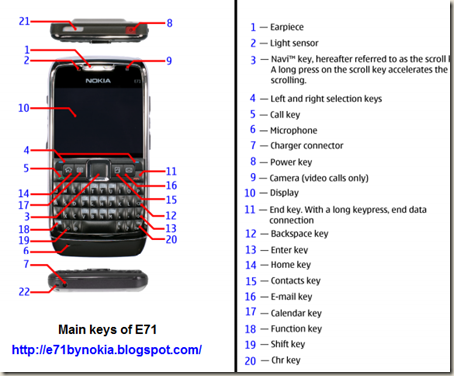
    Keys for Nokia E71
  • SMS and MMS delete shortcut

    Use the backspace key to delete SMS and MMS while reading them.
  • Quick search on contacts while writing SMS

    To insert the phone number of a contact while writing a SMS take the cursor to the “to” box and then press the center button of the navigation (“Navi Key”) and the address book would come up where you can select the recipients of your message.
  • Page Scrolling

    You can scroll a page up or down by using the control button + the up button to scroll up. For scrolling down press the control button (Ctrl) + down.

  • IMEI number (unique identification number)

    To get the IMEI of your phone press *#06#

  • Software version of your phone

    To know the software version being used on your phone press *#0000#

  • Wireless MAC address

    To know the MAC address of your phone (for Wi-Fi) press *#62209526#.

Please let me know if these tricks are useful or not. Depending upon the response I will post some more tricks and tips for the E71 and E71x

Technorati Tags: ,,,,,

Stumble Delicious Technorati Twitter Facebook

Wednesday, September 2, 2009

Useful shortcuts or tricks for your E71

Today I will share some useful shortcuts or tricks that I use with my E71.

  • Let the phone read your text messages
    A long press of the left key, at the top left, will initiate your E71 to read any unread SMS messages that might be there in your Inbox.
  • One touch mute
    You can mute your phone by clicking the key between the up and down volume keys. Pressing the button again would unmute your conversation.
  • See the time and date at any time
    When the phone is in the locked state and the screen is blank, hit the Navi Button to displayMain keys of E71 phone the time and date in a large font.
  • Mark multiple messages or emails
    Use the shift and Enter key to mark and unmark mails, SMS and Email messages. This shortcut also works for files in the file browser which is present in the office folder.
    You can also use the shift and navi keys
  • In Real Player
                   Press 'fn' twice then press 2 for full screen
                   Press and hold 'navi button up' to fast forward
                   Press and hold 'navi button down' to rewind
  • Bluetooth
    To activate or deactivate blue tooth press and hold the * key
  • Changing profiles
    To switch between general and silent profiles press and hold the # key
  • Access browser
    To access the browser from anywhere in the menu press and hold the 0 key
  • Dial 1-800 ANYTHING
    If you want to dial a 1-800 number where you know only the alphabets of the 1-800 number here is a trick for you dial it easily.
    Dial 1800, hit Fn, then Shift twice, type the alphabets, and press the Call/Green key to dial. The number will be dialed. Isn't that neat?
  • Delete one character a time after the cursor
    To delete one character at a time after the cursor press the shit and the backspace button.
  • Select the text input option
    Messaging, press Fn (most left bottom button) + Spacebar = gives input option such as turn on/off predictive text, settings, writing language, input method.
  • Disconnect all connections
    Press and hold the end button to close all connections (call, GPRS, Wi-fi, Bluetooth)
  • Choose language
    Shift+Ctr jumps directly to language selection section.

I will be sharing more tips about the E71 in the future posts under the category of E71tricks.

If you have any shortcuts or tricks for the E71 please share them.

Technorati Tags: ,,,,,

Stumble Delicious Technorati Twitter Facebook

Related Posts with Thumbnails

Copyright © 2009 Nokia E71 All rights reserved. Theme based on theme by Laptop Geek.

Creative Commons License
E71 by Nokia Blog by Pali madra is licensed under a Creative Commons Attribution-Noncommercial-Share Alike 3.0 United States License.
Based on a work at e71bynokia.blogspot.com.