- News and Updates on Nokia E71

Sunday, July 5, 2009

A colorful and minimalistic theme for your E71 and E71x

I’m going to share two of my favorite themes today for E71 and E71x by Nokia phones. All themes that I share on this blog have been tested by me personally.

S60 BLACK THEME FOR E71

AcidSonic’s S60 black theme was one of the featured theme on Symbian Freak. The S60 black theme contains icons by AcidSonic.

Highlights of the S60 black theme are
S60 black theme for E71, E71x and S60 phones

  • Dark theme
  • Colorful theme which primarily uses steel grey, green and pink
  • High contrast and colorful icons. The icons that have been used are Acidsonic’s icons which are crisp and modern. The address book and contact book do not follow the theme style and design on the E71
  • S60 logo on the home screen

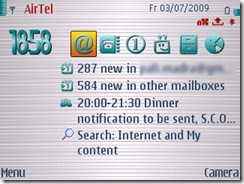
Screenshot of S60 Black theme for E71, E71x and S60 phones

Download
Download the S60 Black theme from Rapidshare
Download the S60 theme from Box.net
Download the S60 Black theme from Symbian Freak

SKETCH THEME FOR E71 OR E71X PHONES

The Symbian Freak theming community is quite vibrant community. Another theme that I liked is the Sketch by Sauromatum. The highlights of the theme are

Screenshot of Sketch theme for E71, E71x and S60 phones

  • it is a lightweight theme which frees up some more resources for applications on your E71
  • Minimalistic theme with white base
  • Cursive look to the theme
  • icons are made by Blue_Ray
  • Two options are available one with default icons and the other with customized icons

Screenshot of Sketch theme for E71, E71x and S60 phones

Download
Download the Sketch theme with customized icons from RapidShare
Download the Sketch theme with customized icons from Box.net
Download the Sketch theme with customized icons from Symbian Freak
Download the Sketch theme with default icons from Symbian Freak

Let me know what kind of themes would you like to be posted here in the future.

Technorati Tags: ,,,,

Stumble Delicious Technorati Twitter Facebook

Firmware update for E71 (Vr 300.21.012) camera photo quality fix?

In a earlier post on this blog I had reported that the latest firmware update (Vr 300.21.012 dated July 2, 2009) does not improve the quality of the photos taken with E71 or E71x.

However, today I saw that the E71 Fanatics Forum has a post that contains photos taken from E71 before and after the upgrade. There seems to be a marked improvement in the quality of the photos taken with the camera of E71. The annoying purple tinge is no more there in the photos.

The photos were posted on Howard forums by a user called ‘Weirdo’.

Photo taken after the firmware (Vr 300.21.012) update

Photo taken from E71 before the firmware update Photo taken before the firmware update on E71
Photo taken after the firmware update on Nokia E71 This is exciting news for all E71 owners as one of the biggest complaint of E71 users has been the quality of the pictures taken with E71. This news will push me to update the firmware of my E71 sooner than I wanted to. Most likely I will update the firmware for my E71 today.

Meanwhile if anyone has updated the firmware on their E71 or E71x please let us know if there is a difference in quality of the pictures taken after the firmware update.

Stumble Delicious Technorati Twitter Facebook

Saturday, July 4, 2009

How to use the graphic equalizer in your E71 and E71x

The other day I was going through the post on Tekseven on “Optimize Music Quality on the Nokia E71 / Nokia E71x”. Some of the suggestions to improve the sound quality of your E71 and E71x are

  1. Invest in a quality headsets.
  2. Invest in a quality 2.5mm to 3.5mm convertor.
  3. Adjust music player settings and equalizer.

The last suggestion was particularly interesting but what was surprising for me was that the media player has options for sound settings and graphic equalizer settings. I had never seen those options. While trying to follow the instructions in the post I could not find the graphic equalizer. The post had no information where one could find the sound and graphic equalizer settings. Finally I found the settings and decided to share the information.

SETTINGS FOR GRAPHIC EQUALIZER ON E71
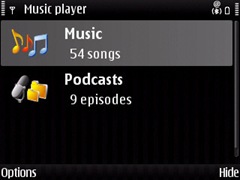
  1. Go to Menu –> Media –> Music Player. The screen you would get is similar to the one below listing the Music and any Podcasts that might be there on your phone.
    Screenshot of Music Player on E71
  2. Selecting music would list all the playlist and songs on your phone. Refer to the screenshot below.
    Music playlist in E71 in the media player
  3. Select ‘All songs’ and you get a list of all songs,
  4. Select one song by clicking the center button of joystick and the media player would start playing the selected song.
  5. When the song is being played press the options button (left button) and you would get the menu with one of the option being equalizer (check the screenshot below).
    Media Player on E71 with the equalizer option
  6. Select equalizer and you would get the presets available for the equalizer which are bass booster, classical, Pop and Rock.
    Media player's equalizer options on E71
  7. You can also create your own preset by using the options (left button) and selecting new preset.
    A new preset option for graphic equalizer on E71
    The graphic equalizer is handy and it does improve the quality a bit depending on the type of music you are listening to.
SETTINGS FOR THE SOUND ON E71
  1. Follow the first 4 steps listed above
  2. After that bring up the options menu by clicking the left button. One of the option would be Audio settings (screenshot below)
    audio settings in E71 for media player
  3. Select audio settings and the next screen would give you the options of setting the balance, loudness and stereo widening (see the screenshot below).
    Audio settings on Nokia E71
  4. It is recommended that the balance should be set to exactly in the center and loudness and stereo widening is off. This is the recommended settings but you can play around with it and check for yourself which one works better.

You can use both the equalizer and audio settings to tweak the sound output of your E71 or E71x to customize it according to your personal preferences. However, these settings do not help in eliminating the hiss which customers complaint about on E71 and E71x.

If you tweak the sound settings please share the audio and graphic equalizer settings that work the best for you.

Stumble Delicious Technorati Twitter Facebook

Firmware update for E71 and E71x phone available - Vr 300.21.012 dated July 2nd 2009

A new software update is available for the the E71 and E71x phones.

To update your E71 you need to

  • install Software update application for E71 from here.
  • backup your phone data (very important) and
  • follow the instructions here.

Software update process for E71 and E71x

IMPROVEMENTS

So what does the upgrade do for you? Some of the highlights are

  • Improved mail for exchange
  • Music Internet Radio added
  • Improved My Nokia application
  • Improved user dialing
  • Inbuilt application for MySpace
  • Inbuilt application for Facebook
  • Inbuilt application for YouTube
  • New theme
  • Improved speed of the phone

IMPROVEMENTS NOT AVAILABLE

These improvements are welcome but some of the improvements that would really help but are not there in the update are

  • the ‘purple tinge’ to the photographs taken by E71 is still there
  • the hiss in the media player is still there

I wish these issues are fixed soon in one of the software updates for E71 and E71x.

BEFORE YOU UPDATE

Some of the users have been complaining of some issues. Though they are nothing serious but learning from others mistakes is definitely helpful

  • Some people have complained that the older connection settings (for data) are not working. For settings I would suggest to input the settings again rather than importing them from the old backup because there are always issues there.
  • Quite a few people (some on this Nokia Forum) have complained that there GPS is not working now.
  • One of the member is having problems accessing the address book on his phone. This is a known problem and we at E71byNokia have discussed this problem and the solution in detail here.

You can also signup for the automatic email notifications for software updates for your phone here.

Technorati Tags: ,,,,

Stumble Delicious Technorati Twitter Facebook

Friday, July 3, 2009

Tweets60 – A free twitter client for your Nokia E71 and E71x

Ravensoft who describe themselves as software design architects have released a Twitter client for S60 phones called Tweets60. The application runs well on E71 and E71x. What’s more it is free!

Screenshot of Tweets60 running on E71

Some of the features of the application are

  • Post directly from your phoneA screenshot of Tweets60 running on E71
  • Faster and more efficient than the mobile site
  • Smart synchronization to keep your data usage to a minimum
  • Keep up to date with automatic polling
  • Manage who you're following on the go

There are other Twitter clients available and the best so far, according to me and others is Gravity. However, Gravity is not free and Tweets60 offers good competition specially given the fact that it is free.

Download Tweets60

Stumble Delicious Technorati Twitter Facebook

A simple elegant theme for your E71 and E71x

Mobile 9 has a new theme for E71 and E71x called  ThreeLightE71 which is simple yet elegant. Some of the features of the theme are

ThreelightE71_theme_002

  • steel grey background
  • customized icons (green color) for your menu
  • three colors for your theme green, steel grey and maroon
  • customized icons for your media player and other tools
  • metal finish to the icons and the interface

ThreelightE71_theme_001

The theme is interesting but I did not like the color combination used in the theme.

Download the theme.

Rating 3 stars for the ThreelightE71 theme for E71 and E71x

Technorati Tags: ,,,,

Stumble Delicious Technorati Twitter Facebook

Thursday, July 2, 2009

Ultimate protective Case for your E71 and E71x phone

I have been on the lookout for a new case for my E71 which I keep dropping every now and then.( I think I can have some record of sorts for it). Earlier I was using a leather case which I had purchased with my E71 which did a good job but the inner lining came off a few weeks back.

I did find an alternative which was not leather but rexin and then I found out about Epikcases on the Tek Seven’s (one of my favorite theme developer and designer for mobile phones) website.

Epikcases for your E71 and E71x

The company that is selling these cases describe this case as a “high quality premium transparent resin gel soft case”. What is great about this case is that it incorporates the advantages of silicon cases and crystal cases and adds to those advantages of having a flexible and protective case for your E71. Now your E71 will never get old!

epikcases for E71 and E71x

The main features are

  1. Perfect fit – Since each phone model has a separate casecase_colors designed specifically for that phone model.
  2. Colors – Lots of colors available to choose from.
  3. Screen Protector – Built in screen protector in each case
  4. Skid Proof – Keep your E71 and E71x scratch and dust free.
  5. Visual transparency – Visual transparency allows you to maintain the look and feel of your phone.
  6. Great PriceOnly $4.99 + shipping and handling charges. They ship all across the world.

DC Mugen has done a good job of marketing the Epikcases. They have a video channel on YouTube dedicated to the Epikcases. Check it out!

I would definitely recommend the cases and have ordered for one already. Please share information on the case you use for your E71 or E71x as it would be interesting to know how people protect their phones.

Technorati Tags: ,,,,,

Stumble Delicious Technorati Twitter Facebook

Related Posts with Thumbnails

Copyright © 2009 Nokia E71 All rights reserved. Theme based on theme by Laptop Geek.

Creative Commons License
E71 by Nokia Blog by Pali madra is licensed under a Creative Commons Attribution-Noncommercial-Share Alike 3.0 United States License.
Based on a work at e71bynokia.blogspot.com.