- News and Updates on Nokia E71

Sunday, October 11, 2009

Protection cover for E71 by BodyGaurdz

By the growth in the number of case manufacturers for different mobiles it seems that the marketBodyGaurdz - Covers for your Nokia E71 and Nokia E71x for mobile cases is huge. While surfing I found another product BodyGaurdz which is a casing and screen protector (or body and screen protector)  for E71 and E71x phones. BodyGaurdz manufacture's covers for nearly all the mobiles.

Some of the features are

  • Tough - (though I believe the Nokia E71 itself is pretty tough. Many owners of Nokia E71 and Nokia E71x will vouch for it)
  • The product is made of three invisible layers of the same material that is used for protecting cars windshields.
  • Prevents scratches to the body and the screen of the E71.
  • Since the covering is transparent the look and feel of the phone is not lost due to the casing.
  • Two versions available – one for the screen for $14.95 (for 2 screens) and full body cover for $24.95.
  • There is an installation video available as well.

BodyGaurdz - Covers for your Nokia E71 and Nokia E71x If you are looking for phone covers, protectors or cases please read reviews of other similar products for the E71 by Nokia blog go here as it will help you made a better educated decision.

If you are aware of a product for Nokia E71 or Nokia E71x which you think is cool please send us a quick note and we will review it on the E71 by Nokia ( and if you want to post a review you are welcome to do that as well – send your requests to pali dot madra at gmail dot com – for dot use “.” in both the instances). However, publishing of the post is subject to approval.

Technorati Tags: ,,,,,

Stumble Delicious Technorati Twitter Facebook

Friday, October 9, 2009

Using Twitter on Nokia E71 and Nokia E71x – Part 1 mobile sites

On Twitter there are lots of queries of how to use Twitter on their Nokia E71 or Nokia E71x.

Mainly there are two ways you can access Twitter on your Nokia E71. The first is web based (from your browser on you Nokia E71) and the other is a third party applications.

Web Based

twitter2go

Twitter2go is a very basic mobile interface to access Twitter. I would not recommend this service thought and the reasons are

  • Unsecure login – Your password is not encrypted. Forget encrypting the password while entering the password you can see the password as asterix are not displayed but your actual password is seen on the screen.
  • Only two functionalities are provided – check your timeline and post updates
  • Very confusing login. The interface acts as if you have been logged in even if you use the wrong credentials.

However the update and status features work perfectly.

Twitter Mobile website

This is the official mobile interface for the Twitter mobile website.

The interface of the mobile version of Twitter is nice and clean. Some of the features are

  • The interface is clean
  • Better functionality as compared to other web based twitter services.
  • You can see your timeline, view your profile, see those people whom you follow and also view the public timeline.

If you want to use the web interface for accessing Twitter on your Nokia E71 this is the resource to go in for.    

Twapper

Twapper which lets you keep up with twitter on your mobile phone brower. You can access the twitter updates for any tweeter using the URL http://m.30boxes.com/twapper/twitter_username eg.http://m.30boxes.com/twapper/e71nokia. Twapper has built in image support for flickr! Yes, you can now photo share via twitter by including any flickr photo page as a link in your twitter post.

A new version has been rolled out Twapper 2.0b with some additional features and they are

  • Twapper lets you roll your own "twitter groups" so you can bookmark and track sets of people (in this case, you'd get a bunch of incredibly verbose twitter zealots!) — yes TWITTER GROUPS. For example http://m.30boxes.com/twapper/e71+e71nokia+e71fanatics.
  • links to flickr photo pages display images
  • If you register yourself on 30 boxes then you can also post updates to twitter through Twapper.
  • Twapper also lets you direct message someone when you are looking at "just so-and-so" 

In the end Twapper has some good features but the downside it that it does not provide you the full functionality of Twitter.

Conclusion

If you want to use all the features of Twitter on your Nokia E71 and you want to use the browser only the Twitter Mobile site is the best option. Personally I would go in for a mix of Twitter Mobile and Twapper.

Please share your thoughts on the web based mobile Twitter applications. If you know of a service which should have been included please post a comment and I will try and review it.

Next I will be reviewing the third party applications that can be used on the Nokia E71 to access and manage your Twitter account.

PS: Sorry for not adding screenshots. I like to take actual screenshots on my E71 whenever I post them on the blog. I have taken the screenshots but they need to be edited. I will be adding screenshots to the post tomorrow.

Stumble Delicious Technorati Twitter Facebook

Monday, October 5, 2009

Freeware for Nokia E71 and Nokia E71x – Part 1

Lots of users request information for applications (apps) which are freeware for Nokia E71 and Nokia E71x.

I will be reviewing the freeware for Nokia E71 and Nokia E71x. 5 freeware applications would be discussed in each post. The posts will be tagged as freeware. Though some of the applications might not work with Nokia E71x but most of them should. If an application does not work on Nokia E71x may I request you to please leave a comments on this post.

 Opera Mini Logo Opera Mini 5

Download

With this new version Opera Mini has become a “must install” even though the default browser in Nokia E71 is a huge improvement if compared to the earlier browsers in the E-series of Nokia. Some of the features of Opera Mini 5 are Nokia E71 Opera Mini screenshot

    • tabbed browsing
    • speed dial with Thumbnails
    • copy/paste text on a page
    • password manager
    • built for speed
    • power scrolling
    • sync Bookmarks
    • save web pages for later and
    • a new powerful user interface (UI)

To know more please read a review post of Opera Mini 5 beta


Google icon Google Maps

Download or visit google.com/gmm on your phone

With a host of new features added to Google Maps for mobile Google Maps is an another application which one should have installed on your Nokia E71 or E71x. Google Maps street view Screenshot from Nokia E71 or Nokia E71x

The new features include

    • street view (since Street View has gone international it is no more restricted to users in USA)
    • request walking directions (in addition to driving and public transit) to get anywhere on foot,
    • receive transit alerts from participating public transportation authorities,
    • see what other people think of a place by reading reviews directly on your phone
    • new interface for smaller learning curve.


Read an earlier post which had a detailed review of Google Maps for Nokia E71

Ovi Maps deserves a mention but personally I would recommend Google Maps over Ovi Maps.


 mobbler Mobbler

Download

Mobbler is an application that allows you to stream your channels for Last.fm. Last.fm is a socialNokia_E71_mobbler_screenshot music website that allows you to specify your favorite type of music then it streams those artists and similar artist to your customized radio stations.
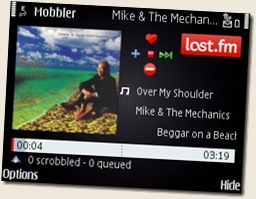
To quote the Mobbler website

Mobbler, Mobile Scrobbler, is a last.fm radio player and scrobbler for Nokia S60 3rd edition smartphones. It allows you to listen to your last.fm radio stations and to scrobble tracks played using the Nokia S60 Music Player. Music player scrobbling can be done both whilst you listen, or queued offline to be submitted later.

 If you have not tried Mobbler give it a try and I would say it is one of the best music application available for Nokia E71 and Nokia E71x


Google Icon YouTube

Download

YouTube for mobile enables you to convert your phone into a multimedia device. Some of the Nokia E71 YouTube Screenshotfeatures of the Youtube application for mobile are

    • Browse millions of videos
    • Access your YouTube account
    • Upload videos
    • Keep a tab on the top rated videos on YouTube
    • Search for videos on YouTube


image JoikuSpot Light

Download

JoikuSpot Light is an application which turns your Nokia E71 or Nokia E71x into a WiFi HotSpot. The Nokia E71 Screenshot of JoikuSpot running light version of the software is free. The light version can handle on http or https traffic. If you want to use VPN, POP, IMAP or secured access then you would have to buy the full version which is available here and costs 4.99 Euros for 6 months usage or 15 Euros for lifetime usage.

Please let the community know your thoughts about these freeware for Nokia E71 and Nokia E71x by commenting on the post.

Look out for Freeware for Nokia E71 and Nokia E71x Part 2 which would be available in a couple of days.

Stumble Delicious Technorati Twitter Facebook

Thursday, October 1, 2009

Which apps do you have on your home screen of E71

I thought it would be interesting to know the favorite apps of users of E71.Home Screen of E71 screenshot

I have the following apps on my home screen

    • Messaging
    • Active notes – honestly I have not used it ever
    • Handy Expense
    • Gravity
    • Y-Browser and
    • Handy Alarm Pro

Please share the applications you have on the home screen of your E71. I hoping this discussion would unravel some great applications.

Stumble Delicious Technorati Twitter Facebook

Wednesday, September 30, 2009

Free Mobile Ringtones for your E71 and E71x

One of the features I like about the Iphone are the ringtones.

I decided to share some original ringtones that come with Iphone for the E71 and E71x users. You can download the free mobile ringtones ( A big thank you to Andres, Angel, Jeff – if it was not for them I would have had the wrong link up and people would have been cursing me) download the free mobile ringtones from the correct link (these ringtones can be used by any phone that supports MP3 ringtones).

INSTRUCTIONS

All you need to do is

    • Download the archive to your desktopFree mobile ringtones for E71
    • Unzip the archive (using the windows archive utility, Winrar or 7z)
    • Once you have unzipped the files upload the files (via Bluetooth or using the cable) to the sounds directory on your memory card.
    • Go to Settings –> Profile –> Select general (or any other profile you want to customize) 
      –> Options –> Personalize –> Ringtone –> Options –> Change and then browse to the file you uploaded and select it. I have created a video since you may find the steps above confusing.
How to change a ringtone on a E71

How to change a ringtone on a E71

Let me know what you think about the free mobile ringtones and I can share a whole lot of them in the future.

Stumble Delicious Technorati Twitter Facebook

Tuesday, September 29, 2009

Mobile Smartphone Software for E71 – Mobile Task Manager

One of my favorite mobile smartphone software developer is Tommi Laukkanen. He has been actively involved in development of Twim – a Twitter client for S60 phones.

Tommi also released a software called Mobile Task Manager in July 2009. It caught the fancy of the community and was mentioned on the Nokia Mobile talk blog and the All About Symbian blog (you can read the post here relating to the earlier release). Most of the reviews recommended the software though all of them felt that polishing of the application was needed.

Mobile Task Manager runs on all Java Enabled phones.

Features of Mobile Task ManagerScreenshot of Mobile Task Manager
      • Create actions
      • Edit actions (with 3 key)
      • Mark action as done (with fire key)
      • Purge done items
      • Create folders
      • You can add notes to actions (with 9 key)
      • You can rearrange the actions (with left/right keys)
      • Mark action as favorite (with 7 key)
      • Change task priority (with 0 key)
IMPROVEMENTS MADE IN MOBILE TASK MANAGER

The new version of Mobile Task Manager has now been renamed as MobileGTD. A few days back Tommi released the Version 1.2 of Mobile Task Manager. Some of the improvements in the software were

      • Prioritize todo items (none, low, normal, high)Screenshot of Mobile Task Manager by Tommi Laukkanen
      • Priority shown as flags (none, green, yellow, red)
      • Priority can be changed from item view (left/right key)
      • or straight from item list with '0′ shortcut key
      • You can sort items by name, done-status or priority
      • Import items from text file or CSV file
      • FIX: pressing '3′ causes the item below the one highlighted to open up for editing
      • FIX: "Delete selected" will not delete the last entry on a folder
      • FIX: pressing '9′ does not work for quick note editing


These are great improvements and I can see the software developing into a GTD (Getting things done) application.

If you are already using Mobile Task Manager you will need to uninstall that earlier version to update the software to the new version.

I tried the software on my E71 and it worked like charm and I do find it useful and handy to use. It will be a great add-on to my Handy Expense software to keep track of myself.

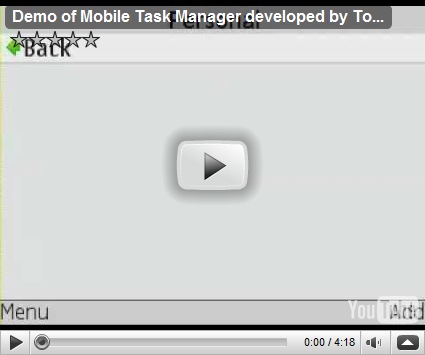
DEMO for Mobile Task Manager

Here is a demo of the Mobile Task Manager running on my E71


DOWNLOAD – MOBILE TASK MANAGER – SMARTPHONE MOBILE SOFTWARE

Stumble Delicious Technorati Twitter Facebook

Tuesday, September 22, 2009

New variant of - Nokia E71 drivers edition

Nokia UK has launched a variant of E71 called Drivers edition.

The version is the same as the normal E71 but comes a get mobile charger which can be plugged into the cigarette lighter socket for rapid charging, and find the fastest way to your destination with a 1 year navigation license.

Nokia E71 drivers edition

It also comes with latest Quick Office. What is interesting is that Nokia site mentions that the Quick Office upgrades would be available for life with the e71 drivers edition. To quote the website

“You'll also get Quickoffice licence for life, giving you free upgrades to the latest available version of Quickoffice.”

Does that mean all the E71 device owners will always get the free upgrades for Quick Office. Since I bought the phone about 15 months back I have been getting free updates therefore I believe it is true that upgrades for Quick office would be free.

Source: http://noknok.tv/2009/09/21/nokia-e71-drivers-edition-launched/

Stumble Delicious Technorati Twitter Facebook

Related Posts with Thumbnails

Copyright © 2009 Nokia E71 All rights reserved. Theme based on theme by Laptop Geek.

Creative Commons License
E71 by Nokia Blog by Pali madra is licensed under a Creative Commons Attribution-Noncommercial-Share Alike 3.0 United States License.
Based on a work at e71bynokia.blogspot.com.